
Download EZ-Crosshair – crosshair, aim, accuracy, gaming overlay, customizable, community, animations, utility
Overview
EZ-Crosshair is a mobile application developed by SoftPas, designed to enhance the gaming experience through customizable crosshair overlays. Tailored for mobile gamers, the app enables users to create and apply personalized crosshairs that align with their individual aiming preferences. By adjusting visual elements such as shape, color, size, and effects, players can optimize their on-screen targeting for improved accuracy and consistency across various games. The app serves as a utility tool for those seeking a more tailored and immersive gameplay experience, particularly in fast-paced shooters where precision is critical.
Target users include mobile gamers who value customization, competitive players aiming to refine their aim, and enthusiasts who enjoy experimenting with visual overlays. The app supports community-driven sharing, allowing users to discover and download crosshairs created by others, fostering a collaborative environment. Real-world use cases include adapting crosshairs for different game genres—such as tactical shooters, battle royales, or first-person action games—where visual clarity and personal preference play a significant role in performance.
Within the mobile gaming ecosystem, EZ-Crosshair fills a niche by offering a lightweight, dedicated solution for crosshair customization. While many games lack built-in crosshair options, this app provides an external layer that enhances gameplay without requiring device modifications. Its focus on user empowerment and community interaction positions it as a valuable asset for gamers seeking both functionality and creative expression.
Key Features & Functionality
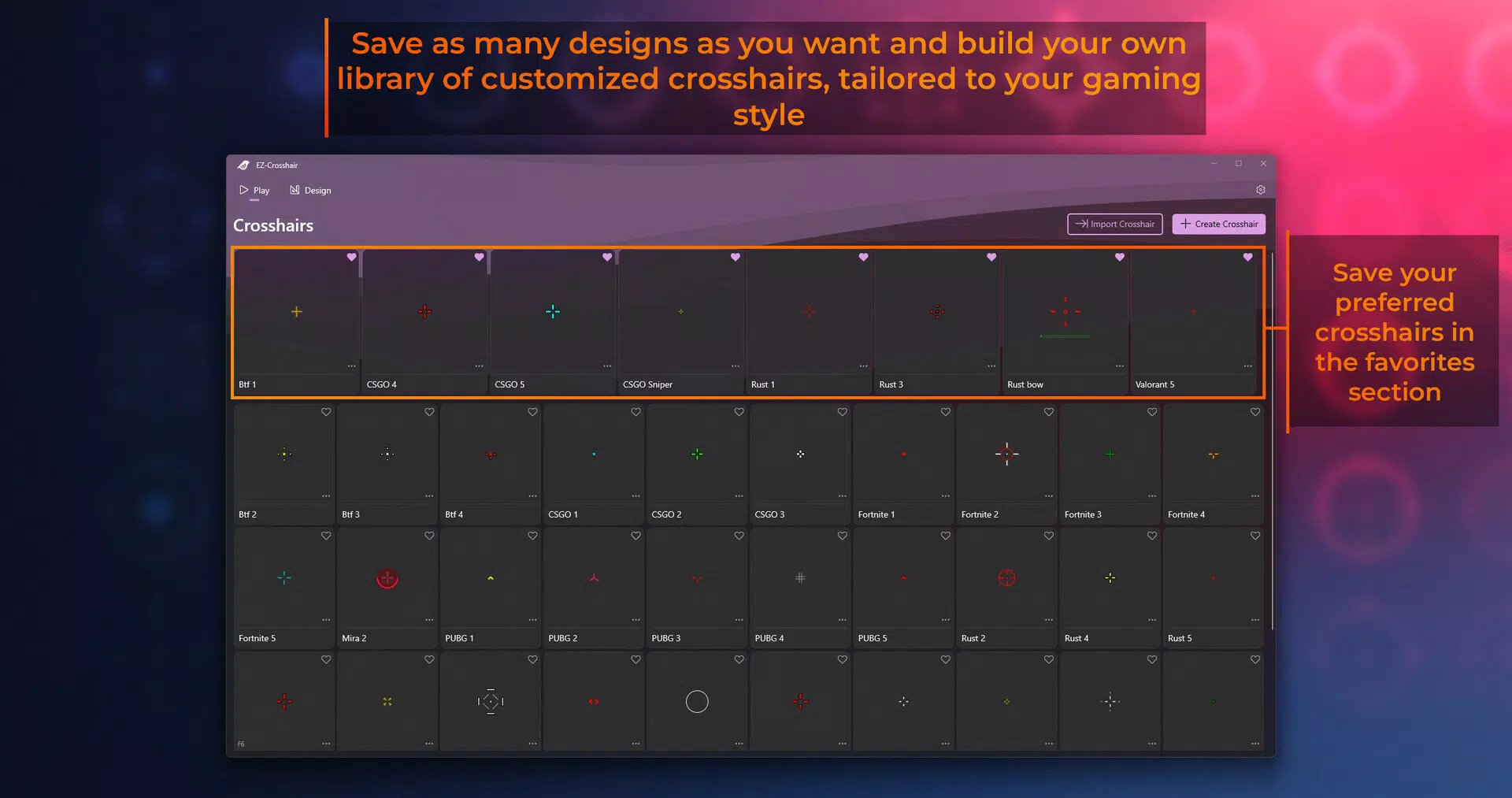
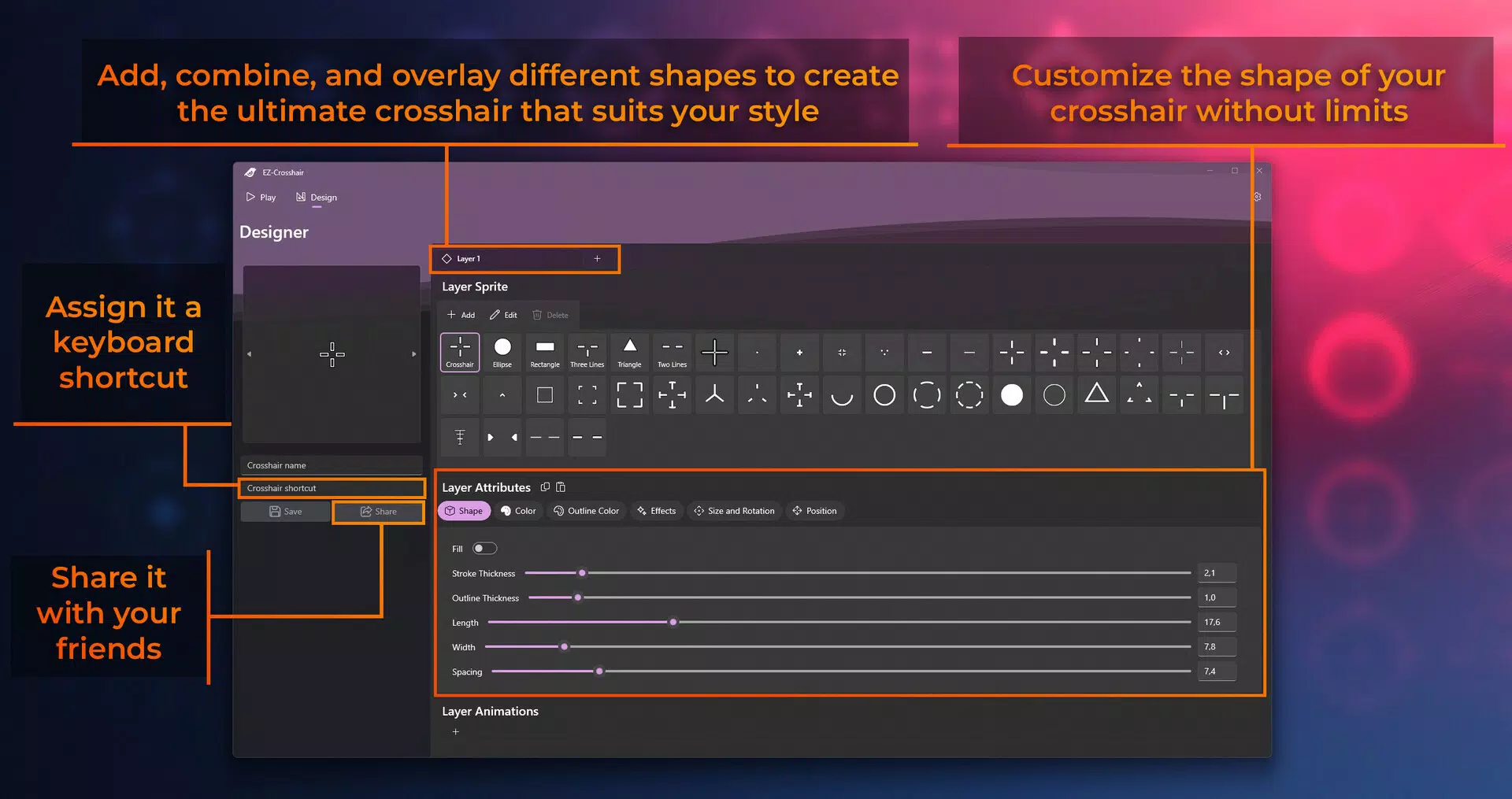
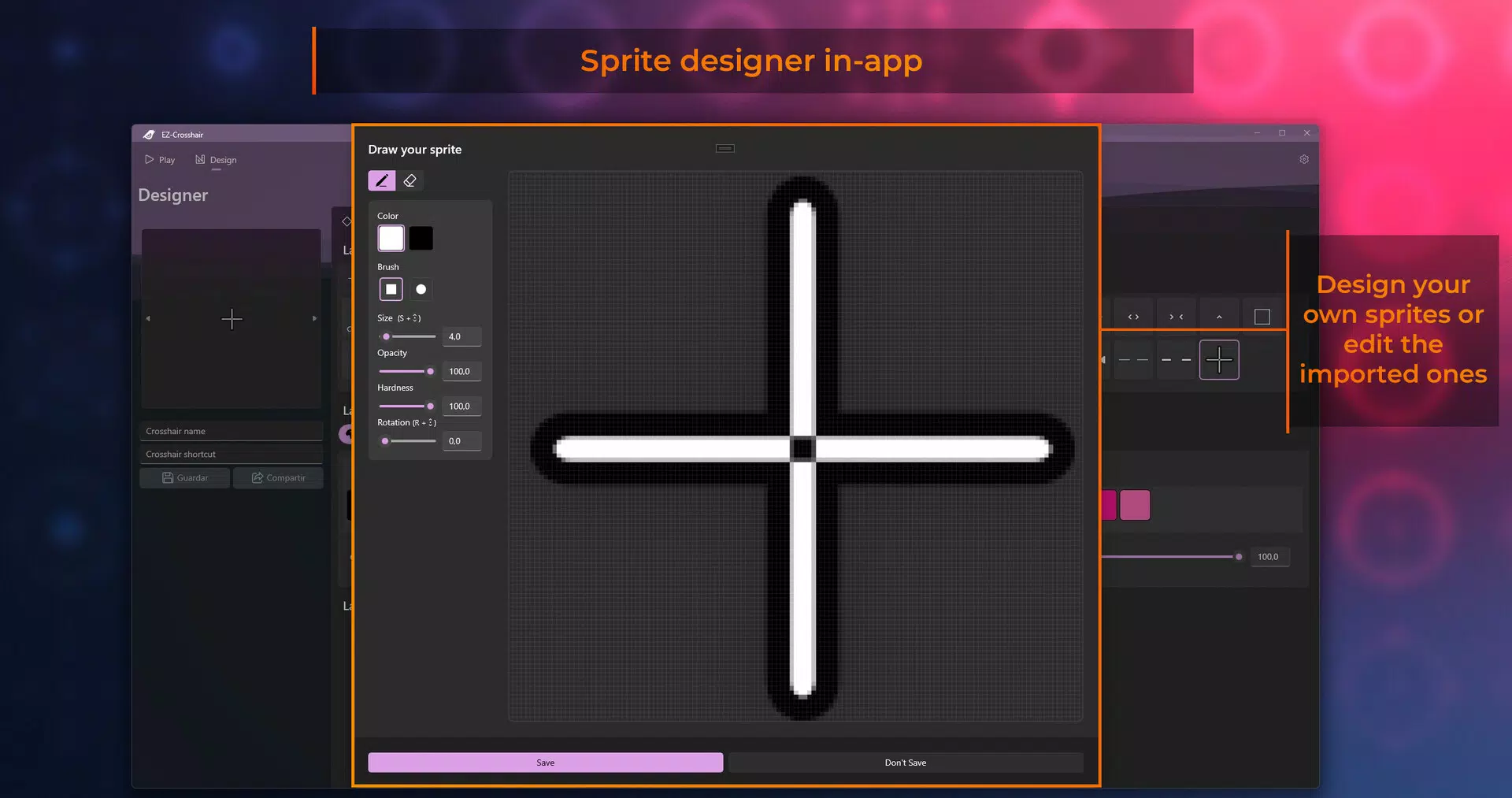
- Customizable Crosshairs: Users can design and save unique crosshairs by modifying shape, color, size, and visual effects. This allows for precise alignment with personal aiming techniques and game-specific requirements.
- Community Interactions: The app enables users to browse, download, and share crosshairs with others. This feature promotes collaboration and inspiration, allowing players to adopt designs from the community or contribute their own.
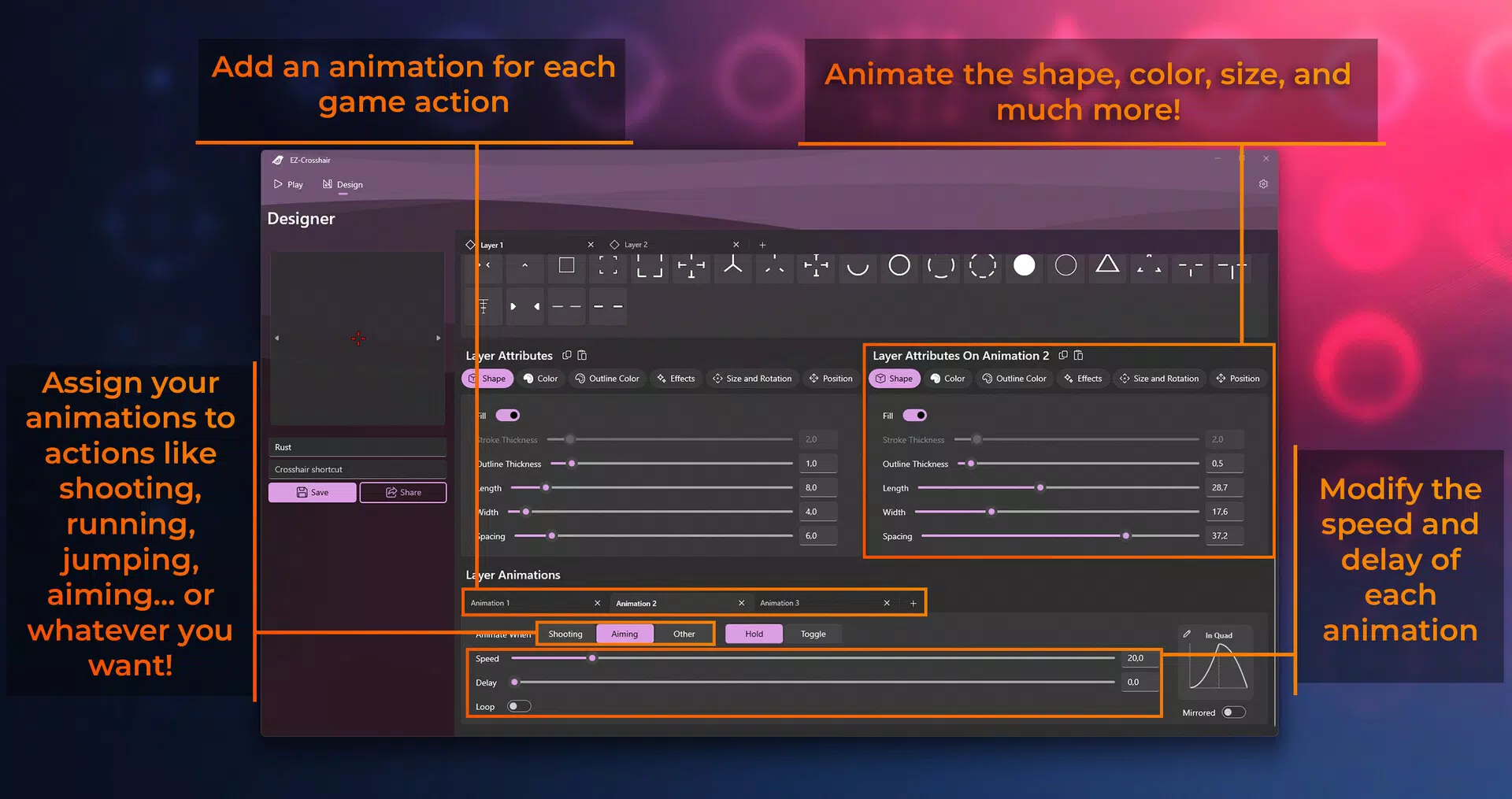
- Animations and Effects: Crosshairs can be animated to respond to in-game actions such as aiming or shooting. These dynamic visual cues add depth to the gameplay experience and can improve situational awareness.
- User-Friendly Interface: Designed with accessibility in mind, the interface allows for intuitive navigation. Gamers of all skill levels can quickly create and apply custom crosshairs without technical barriers.
- Shortcut Functionality: Players can assign quick-access shortcuts to toggle crosshairs on and off during gameplay. This enhances responsiveness and enables seamless switching between different configurations based on game scenarios.
For example, a player might create a minimalist crosshair with a subtle glow for long-range sniping, then switch to a pulsating animated version during close-quarters combat. The ability to customize and rapidly adapt crosshairs supports strategic gameplay and personal preference, making the app a practical tool for both casual and competitive users.
Interface, UX & Performance
EZ-Crosshair features a clean, minimalist interface focused on functionality and ease of use. The layout is organized into clearly labeled sections, allowing users to access customization tools, community libraries, and settings with minimal navigation. Visual design emphasizes clarity, with intuitive icons and straightforward menus that reduce cognitive load during setup.
Navigational flow is linear and consistent, guiding users through the creation and application of crosshairs in a logical sequence. The app maintains responsiveness across various Android device categories, ensuring smooth interaction even on mid-range hardware. Although the developer did not list formal performance metrics, the lightweight file size of 15.4 MB suggests optimized resource usage.
Stability appears to be a priority, as the app functions without reported crashes or freezes in standard usage. The interface remains consistent during transitions between modes, and animations are rendered without noticeable lag. Users can expect a reliable experience during both setup and active gameplay, with minimal impact on device performance.
Platform Compatibility & Technical Requirements
EZ-Crosshair is available exclusively on the Android platform. The current version is 1.2.0, with a file size of 15.4 MB. The app is free to download and install, making it accessible to a broad audience.
The developer did not specify minimum OS requirements or compatibility details for specific Android versions. As such, users should ensure their devices meet standard Android functionality criteria. The app’s lightweight nature suggests compatibility with most modern Android smartphones, though users are advised to check for updates or compatibility notes from the developer.
Pros and Cons
Pros
- Lightweight design with minimal storage footprint
- Intuitive interface suitable for all skill levels
- Supports community sharing and collaborative customization
- Enables dynamic animations for enhanced gameplay immersion
- Offers quick-toggle shortcuts for real-time adjustments
Cons
- Specific compatibility requirements were not disclosed
- Developer did not provide performance benchmarks or optimization details
- Android-only availability limits cross-platform access
- Community features may vary in content quality without moderation
- Animations may consume additional battery or system resources
FAQ
Is EZ-Crosshair safe to install on my Android device?
Yes, the app is free and available through official channels. As it does not require root access or system-level permissions, it poses minimal security risk. Users should ensure they download from trusted sources.
Can I use EZ-Crosshair with any mobile game?
The app functions as a screen overlay and is compatible with most games that allow full-screen display. However, compatibility may vary depending on game-specific restrictions or anti-cheat policies.
Are there any in-app purchases or ads?
Currently, EZ-Crosshair is free with no ads or in-app purchases. The developer has not indicated future monetization plans.
How do I update EZ-Crosshair to the latest version?
Updates are automatically available through the Google Play Store or official distribution channels. Users should enable auto-updates or check for new versions manually.
Can I share my custom crosshairs with friends?
Yes, the app supports community sharing, allowing users to export and share their designs with others via the built-in library or external platforms.
Final Thoughts
EZ-Crosshair stands out as a focused, efficient tool for mobile gamers seeking to enhance their aiming precision and visual experience. With its customizable crosshairs, community-driven content, and responsive interface, the app delivers tangible value for players who prioritize accuracy and personalization. The inclusion of animations and shortcut functionality adds a strategic layer, enabling dynamic adaptation during gameplay.
While the app is limited to Android and lacks detailed technical specifications, its lightweight design and free availability make it a compelling choice for mobile gaming enthusiasts. Whether you're a casual player refining your aim or a competitive gamer optimizing your setup, EZ-Crosshair offers a practical, accessible solution.
Download EZ-Crosshair now


